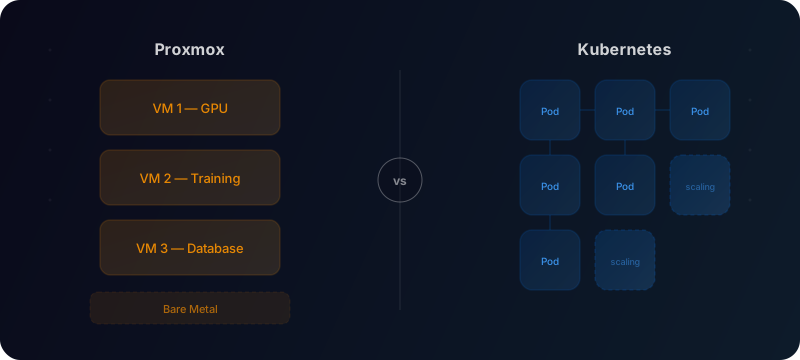
Not every AI workload needs Kubernetes. That might sound controversial in 2026, but after helping teams deploy ML infrastructure across both platforms, I've found the right choice depends on your team size and workload profile, not on industry hype.
What each platform actually does
Proxmox VE is a hypervisor built on Debian Linux. It manages virtual machines (via KVM) and lightweight containers (via LXC) on bare metal, with a clean web UI for allocating CPUs, memory, GPUs, and storage. It includes built-in clustering, high availability, snapshots, and backups, all without licensing costs. Think of it as a self-hosted alternative to VMware.
Kubernetes is a container orchestrator. Originally developed at Google, it automates the deployment, scaling, and management of containerised applications across a pool of nodes. It handles scheduling, networking, self-healing, and rolling updates for container workloads.
The fundamental difference: Proxmox virtualises machines, Kubernetes orchestrates applications. As multiple infrastructure guides point out, these platforms are complementary rather than competitive. Organisations increasingly deploy both together, using Proxmox for the infrastructure layer and Kubernetes for application orchestration on top.
Key differences for AI and ML teams
- Abstraction level. Proxmox gives you full VMs and LXC containers. Kubernetes gives you pods and containers. VMs offer complete OS isolation; containers offer density and speed
- GPU access. Proxmox handles GPU passthrough natively through IOMMU and VFIO. Kubernetes requires vendor-specific device plugins (stable since v1.26 for NVIDIA, AMD, and Intel GPUs according to the official Kubernetes documentation)
- GPU sharing. Proxmox supports NVIDIA vGPU with SR-IOV on Ampere and newer cards, letting multiple VMs share a single physical GPU. Kubernetes supports GPU time-slicing through the NVIDIA device plugin, splitting a GPU across multiple pods
- Learning curve. Proxmox requires Linux admin skills and feels familiar. Kubernetes demands distributed systems knowledge: etcd quorum, overlay networking, persistent volume claims, and YAML manifests
- Scaling model. Proxmox scales manually or with scripting. Kubernetes scales automatically based on resource demand
- Storage. Proxmox offers traditional disks, snapshots, and native Ceph integration. Kubernetes uses persistent volumes and StatefulSets, with CSI drivers like ceph-csi bridging the two worlds
When Proxmox wins
Homelab and small-team GPU servers. If you have one to three machines with GPUs, Proxmox is the simplest path to running multiple workloads. Pass a GPU through to a VM via IOMMU/VFIO, install your CUDA drivers, and you are training models in an afternoon. No cluster networking, no etcd to babysit.
Long-running training jobs. Model training typically means a single process consuming a full GPU for hours or days. Kubernetes' strengths (autoscaling, rolling deployments, service discovery) add no value here. A VM with GPU passthrough is simpler and has less overhead.
Mixed workloads on shared hardware. Need a development VM, a database, and a GPU training environment on the same server? Proxmox handles this naturally with resource allocation across VMs. Each workload gets its own isolated environment without container orchestration complexity.
Teams without dedicated DevOps. Proxmox's web UI and familiar Linux admin model means your ML engineers can manage infrastructure without becoming Kubernetes specialists. In my experience, this is a real advantage for small consulting teams and startups where every hour counts.
Rapid prototyping. Need a fresh Ubuntu VM with a specific CUDA version? Proxmox lets you clone a template in seconds. You can snapshot before risky experiments and roll back instantly. This kind of fast iteration is harder to achieve when you need full OS-level control inside Kubernetes containers.
When Kubernetes wins
Inference at scale. Serving models to production traffic is where Kubernetes excels. Horizontal pod autoscaling, load balancing, health checks, and rolling updates handle variable request volumes without manual intervention. Tools like KServe and Triton Inference Server are built for this environment.
Microservice architectures. If your AI system involves multiple services (an API gateway, a retrieval service, a model server, a post-processing pipeline), Kubernetes' service discovery and networking model makes inter-service communication straightforward.
CI/CD-heavy workflows. If you are retraining models frequently and deploying new versions multiple times per day, Kubernetes' declarative deployment model and its ecosystem of CI/CD tools (Argo, Flux, Tekton) make this pipeline manageable.
Multi-cloud and hybrid deployments. When workloads need to span cloud providers or bridge cloud and on-prem, Kubernetes provides a consistent abstraction layer. Your deployment manifests work the same everywhere.
The hybrid approach: run both
The teams I work with that get the best results often run both platforms. Community experience and practical deployment guides consistently point to the same pattern: Proxmox for the virtualisation layer, Kubernetes for application orchestration on top. The recommended approach, according to practitioners, is running Kubernetes inside Proxmox VMs rather than on bare metal or in LXC containers. LXC containers lack the kernel access that persistent storage solutions like Longhorn and Rook require, making them impractical for production Kubernetes.
A common architecture I recommend:
This gives you the simplicity of VMs where it matters (training) and the operational power of Kubernetes where it matters (serving).
My recommendation
Start by asking two questions.
How many people will manage this infrastructure? If the answer is one or two, Proxmox's operational simplicity is a significant advantage. Kubernetes clusters need ongoing care: upgrades, certificate rotation, etcd maintenance, network policy management. Single-node Kubernetes is not suitable for production, and distributing control plane nodes across multiple hosts adds real complexity.
What does your workload look like? Batch training and experimentation favour Proxmox. High-availability serving and microservices favour Kubernetes.
If you are an AI team getting started with on-prem infrastructure, start with Proxmox. You can always layer Kubernetes on top when your serving needs demand it. Starting with Kubernetes when you do not need it means spending weeks on cluster setup instead of training models.
The best infrastructure is the one your team can actually operate. Complexity you cannot manage is worse than capability you do not have.
If you are evaluating infrastructure for your AI workloads, I help teams navigate these trade-offs. Get in touch.